How to set up Mosquitto with a Let's Encrypt certificate
This how-to guides you through the setup of a Mosquitto MQTT broker with an automatically renewing Let's Encrypt certificate, obtained via Certbot.
Prerequisites
To complete the how-to, the following is necessary:
- Root access to an Ubuntu server, reachable via IPv4 from your gateway.
- A Lobaro wM-Bus Gateway V4 with at least app-nrf91-origin version 0.14.0 and app-nrf91-secure version 0.5.0.
- A USB Config Adapter.
- The Lobaro Config Tool.
Due to missing support for P-384 certificates, Let's Encrypt certificates will not work with app-nrf91-origin firmware versions older than 0.14.0 and app-nrf91-secure versions older than 0.5.0!
If you need to update your gateway, follow the steps at Firmware Update.
If your broker is used solely by Lobaro gateways, you can also use a self-signed certificate authority instead. See How to set up Mosquitto with a self-signed certificate.
Install the necessary components
Start by installing Certbot and Mosquitto on the server:
sudo apt update
sudo apt install certbot mosquitto
Create a Certbot Hook for Mosquitto
Certificates signed by Let's Encrypt are only valid for a short time. Certbot will automatically renew the certificate before expiry, so we create a script that copies the renewed certificate into place and restarts Mosquitto.
-
Add the following script:
/etc/letsencrypt/renewal-hooks/post/mosquitto.sh#!/bin/bash# Set your domain name hereDOMAIN="yourdomain.com"if echo "$RENEWED_DOMAINS" | grep -q "$DOMAIN"; thencp $RENEWED_LINEAGE/fullchain.pem $RENEWED_LINEAGE/privkey.pem /etc/mosquitto/certs/chown mosquitto:mosquitto /etc/mosquitto/certs/fullchain.pem /etc/mosquitto/certs/privkey.pemchmod 600 /etc/mosquitto/certs/privkey.pemchmod 644 /etc/mosquitto/certs/fullchain.pemsystemctl reload mosquittofi -
Make the script executable:
sudo chmod +x /etc/letsencrypt/renewal-hooks/post/mosquitto.sh
Request a certificate
To request a certificate, we will use the Certbot standalone mode, assuming your server is reachable from public internet and has nothing else running on it.
If you have a web server running, for example Nginx, or your machine is not reachable from public internet, you may need to use another method to obtain a certificate. See the Certbot Documentation.
Let's Encrypt is operating multiple Certificate Authorities with different key types. We highly recommend using an ECDSA only chain to reduce the size of certificates transferred during handshakes. Otherwise, the data usage may increase.
To find the current ECDSA only chain name, see this page: Let's Encrypt Chains of Trust. At the time of writing (July 2026), it is called "ISRG Root X2".
Now, to obtain a certificate, we can use this command:
sudo certbot certonly --standalone \
    --preferred-chain "ISRG Root X2" \
    -d yourdomain.com
Copy the certificate for Mosquitto
The hook created in the previous step only runs when Certbot renews a certificate, not on this first issuance. To make the certificate available to Mosquitto now, copy it into place manually, once:
sudo cp /etc/letsencrypt/live/yourdomain.com/fullchain.pem /etc/letsencrypt/live/yourdomain.com/privkey.pem /etc/mosquitto/certs/

sudo chown mosquitto:mosquitto /etc/mosquitto/certs/fullchain.pem /etc/mosquitto/certs/privkey.pem
sudo chmod 600 /etc/mosquitto/certs/privkey.pem
sudo chmod 644 /etc/mosquitto/certs/fullchain.pem
From now on, every renewal is picked up automatically by the hook.
Set up Mosquitto
-
Create a
mosquitto.confwith the following contents:/etc/mosquitto/mosquitto.conflistener 8883capath /etc/mosquitto/ca_certificatescertfile /etc/mosquitto/certs/fullchain.pemkeyfile /etc/mosquitto/certs/privkey.pempassword_file /etc/mosquitto/pwfile -
Add the Lobaro Device CA to
/etc/mosquitto/ca_certificates:sudo wget -O /etc/mosquitto/ca_certificates/lobaro-device-ca.pem https://manuals.lobaro.com/assets/files/lobaro-device-ca.crt-c90e1f12d86dad5a648e7379301de99f.pemsudo openssl rehash /etc/mosquitto/ca_certificates -
Add users to the password file. It is recommended to create separate users for each gateway. To generate a random password, you may use
openssl rand -hex 16.# Create the password filesudo touch /etc/mosquitto/pwfile# Add username + password for each gatewaysudo mosquitto_passwd /etc/mosquitto/pwfile 70b3d5e050020901# Add an admin loginsudo mosquitto_passwd /etc/mosquitto/pwfile admin -
Ensure Mosquitto is run on system boot, and ensure it is restarted:
sudo systemctl enable mosquittosudo systemctl restart mosquitto
Test your broker
Before connecting a gateway, verify that Mosquitto accepts connections using the admin login you created above:
mosquitto_sub -h yourdomain.com -p 8883 --tls-use-os-certs -u admin -P <password> -t '#'
--tls-use-os-certs tells mosquitto_sub to validate the server certificate against your system's trust store, which already trusts Let's Encrypt.
If the command connects without errors, your broker is ready.
Configure the Lobaro Gateway to connect to your broker
To connect a Lobaro gateway to your broker, follow the steps of the Getting Started How-To.
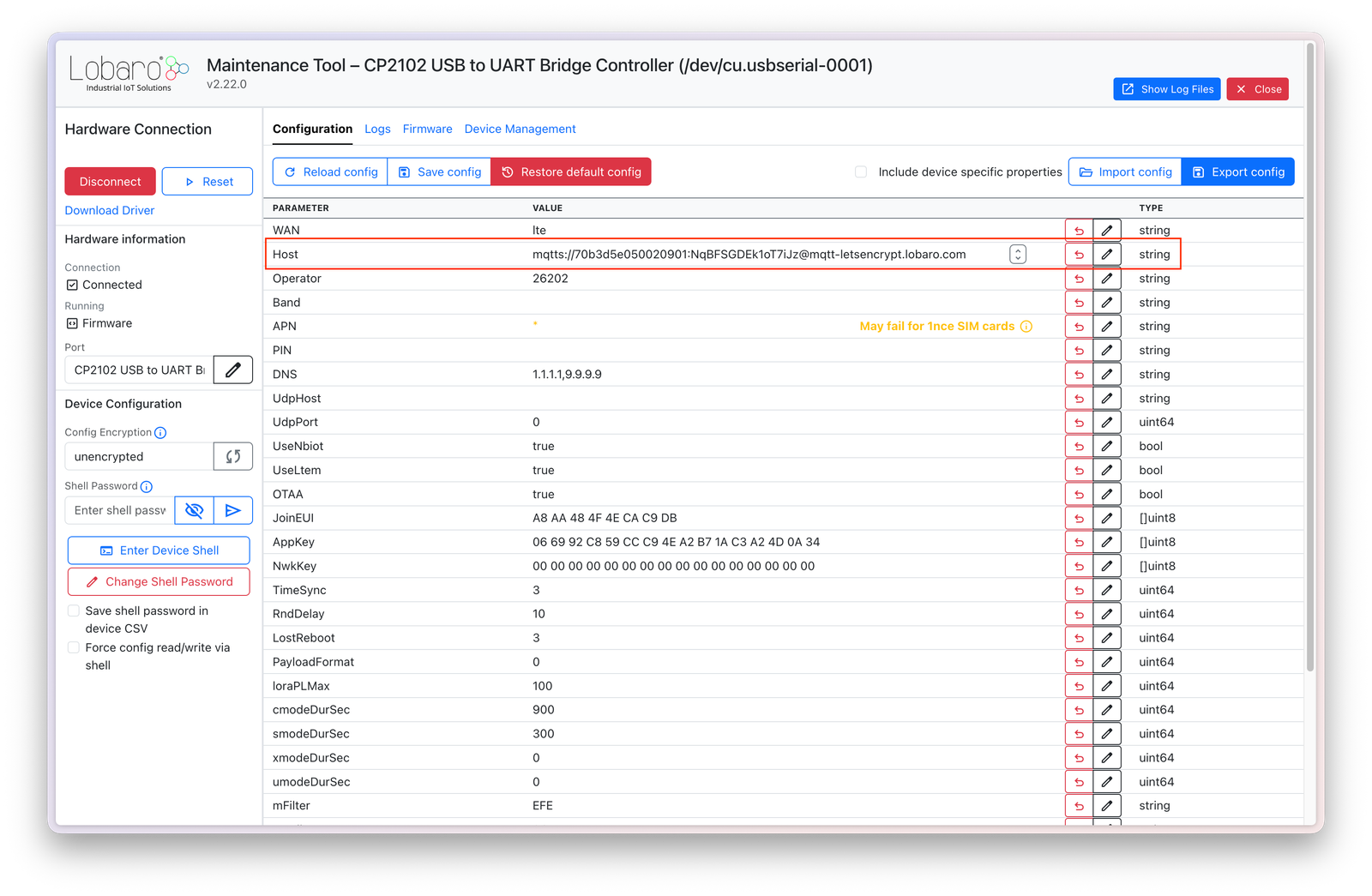
In short, you need to connect to your gateway using the Lobaro Config Tool and then enter the MQTT connection string. Afterwards, the gateway should connect to your broker using its device certificate and should start sending data.