Gateway V4 Repeater
Description
Repeater for wireless M-Bus meter reading — extends the range of wireless M-Bus networks by re-transmitting telegrams from meters to a Gateway V4. The repeater appends its own footer to each retransmitted telegram, including its serial number and received signal strength (RSSI). Suitable for indoor and weather-protected outdoor installation.
Features
- Wireless M-Bus repeater (868 MHz, C1/T1 and S1 modes)
- Appends repeater footer with RSSI and serial number to each retransmitted telegram
- Configurable hop count for multi-hop repeater chains
- Install mode: green LED blinks on each received packet for easy deployment
- RTC (real-time clock) on the Repeater Add-On board for timestamped status telegrams
- Local configuration only via USB Config Adapter (no cloud connectivity, no remote config)
Product Components
- Firmware
- app-nrf91-origin · Firmware updates
- Housing
- LoCube — 122 × 82 × 55 mm
- Power supply
- Battery 38 Ah (Li-SOCl₂, 3.6 V) · External 12 V DC or 230 V AC available
- Optional accessories
- External antenna (SMA) · IP68 encapsulation · LoCube wall mounting kit · Pole mounting kit
Product Identification
- Name: Gateway V4 Repeater
- Type: LOB-GW4-Repeater
- Ordering code:
1201298
LED Signal Patterns
The device uses the standard V4 LED signal patterns. See LED Signal Patterns for the full reference.
During install mode, the green LED blinks on each received packet (or every second). Install mode is active for the first hour after reboot.
Configuration
Configuration is done locally only via the USB Config Adapter and the Lobaro Config Tool. Remote configuration (CoAP / MQTT / LoRaWAN downlink) is not supported.
Configuration Parameters
The Gateway V4 Repeater does not use most of the standard app-nrf91-origin parameters. There is no cloud upload, no NB-IoT/LTE-M/LoRaWAN upload configuration, and no platform connectivity. Only the parameters listed on the Repeater Add-On configuration page apply.
- Repeater Add-On parameters — listen schedule, wM-Bus filters, hop count, RTC, install mode
Firmware Updates
Public firmware downloads for this product are not yet available. They will be published here soon.
If you require a firmware version in the meantime, please contact support@lobaro.de.
Upload Formats
Unlike other Gateway V4 variants, the Repeater has no cloud connectivity — it does not send data to any backend. Instead, it re-transmits received wM-Bus telegrams over the air with an appended footer. A receiving wM-Bus gateway (e.g. a Gateway V4) then handles the cloud upload.
Repeated wM-Bus Telegrams
The repeater appends a Lobaro footer to each re-transmitted telegram:

- Serial number — BCD-encoded, uses the wM-Bus ID format
- RSSI — signal strength at which the repeater received the original telegram
Own Status Telegrams
The repeater periodically sends its own wM-Bus status telegram:
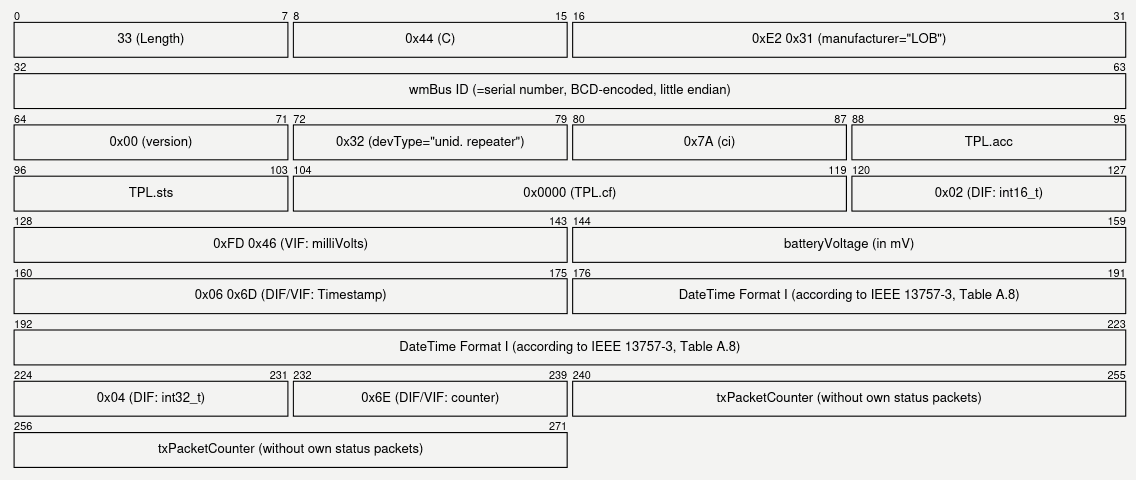
- Serial number — used as wM-Bus sender address
- TPL.acc — access number, incremented with each status telegram
- TPL.sts —
0x00= OK,0x43= RTC error alarm - DateTime — 6 bytes: second, minute, hour, day, month (1–12), year (0–99)
- txPacketCounter — number of re-transmitted telegrams since reboot