Gateway V4 + Edge
Wireless M-Bus Gateway V4 with the Edge add-on — a DIN-rail variant for combined wired M-Bus, Modbus and Ethernet installations.
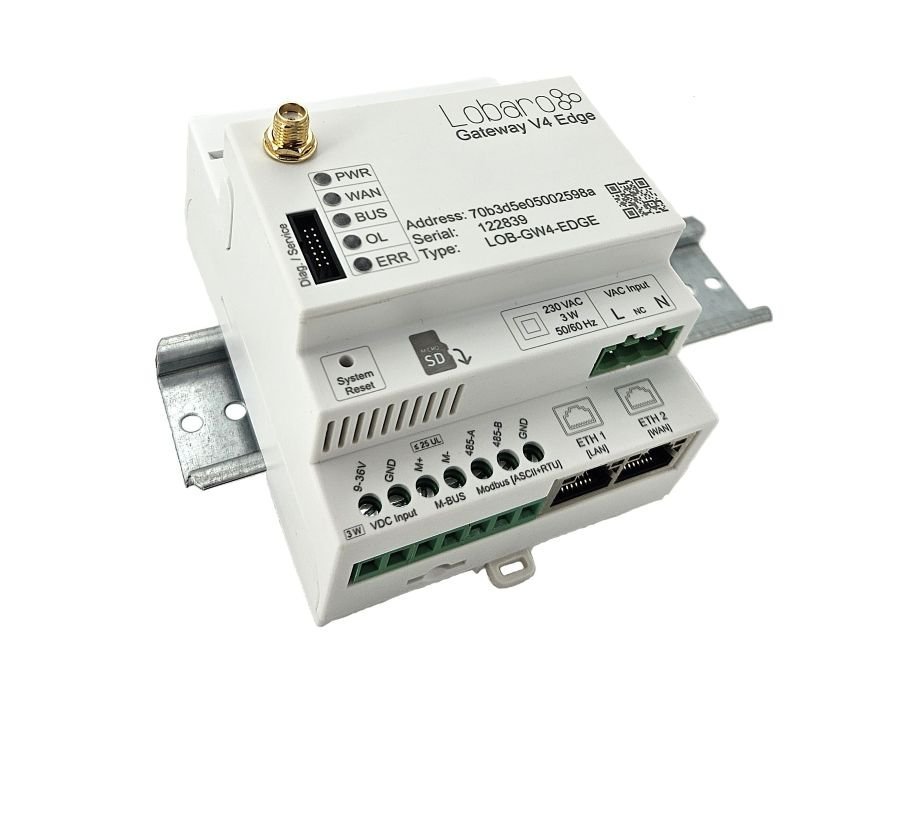
The Edge add-on is available starting with firmware v0.11.0 (pre-release). Order code and detailed connection diagrams are being finalized — contact sales@lobaro.de for current availability.
Description
Gateway for remote reading of wireless M-Bus, wired M-Bus, Modbus (RTU / ASCII) and Modbus TCP values via NB-IoT, LTE-M or LoRaWAN. Housed in a professional DIN-rail enclosure (4 TE wide) with two Ethernet ports and optional PoE. Suitable for indoor and weather-protected outdoor installation.
Features
All Gateway V4 Series platform features plus:
- Wired M-Bus meter reading
- Modbus ASCII / RTU via RS-485
- Modbus TCP over Ethernet
- 2× Ethernet (LAN + WAN), with Ethernet or Ethernet + LTE-fallback uplink
- DIN-rail form factor (4 TE wide)
Product Components
- Firmware
- app-nrf91-origin · Firmware updates
- Housing
- LoCube — 122 × 82 × 55 mm
- Power supply
- Battery 38 Ah (Li-SOCl₂, 3.6 V) · External 12 V DC or 230 V AC available
- Optional accessories
- External antenna (SMA) · IP68 encapsulation · LoCube wall mounting kit · Pole mounting kit
Connections
The Edge gateway provides two Ethernet ports as well as RS-485 and wired M-Bus terminals:
| Port | Label | Usage |
|---|---|---|
| ETH 1 | LAN | Modbus TCP |
| ETH 2 | WAN | Uplink (Ethernet / Ethernet + LTE fallback) — not yet functional |
The Ethernet uplink via ETH 2 is prepared in hardware but not yet supported by the firmware. Use the cellular uplink (NB-IoT / LTE-M) for production deployments.
- RS-485 — Modbus RTU / ASCII master
- Wired M-Bus — M-Bus master for wired meters
- Power — DIN-rail power supply
For the Ethernet uplink and Modbus TCP configuration (WAN modes, ipAddress, modbusCmdConf), see the Edge Add-On configuration.
Detailed terminal pinouts and CAD connection drawings for the Edge enclosure are being prepared. Contact sales@lobaro.de if you need wiring details before installation.
Product Identification
- Name: Wireless M-Bus Gateway V4 Edge
- Type: LOB-GW4-EDGE
- Order code:
TBD
Accessories
| Accessory | Notes |
|---|---|
| USB Config Adapter | For local configuration, diagnostics, and firmware updates |
LED Signal Patterns
The device uses the standard V4 LED signal patterns. See LED Signal Patterns for the full reference.
Configuration
The device is shipped with default configuration parameters. Local changes can be made via the config port using the USB Config Adapter and the Lobaro Config Tool.
For step-by-step instructions, see the Configuration Methods guides:
- 🔌 Local Config via USB — connect directly to the device
- 📡 Remote Config via CoAP — over NB-IoT / LTE-M via Lobaro Platform
- 📻 Remote Config via LoRaWAN — via LoRaWAN downlink
- 🔗 Remote Config via MQTT — for 3rd party MQTT backends
Custom factory configuration is available on request — devices can be pre-configured at production for your specific deployment. Contact sales@lobaro.de when ordering.
Firmware Updates
Public firmware downloads for this product are not yet available. They will be published here soon.
If you require a firmware version in the meantime, please contact support@lobaro.de.
The Edge add-on requires firmware v0.11.0 or newer (pre-release). All Gateway V4 variants run the app-nrf91-origin firmware.
- For further information on how to update the device, refer to: Firmware Update.
A remote firmware update over LoRaWAN is currently not possible.
Configuration Parameters
This product runs the app-nrf91-origin firmware:
LoRaWAN Uplink Formats
- LoRaWAN Protocol — Status Packet (Port 1) and wM-Bus uplink formats
- Edge Add-on LoRaWAN Uplinks
Cellular Uplink (LTE)
Wireless M-BUS Parser
A production-ready parser (including split telegram reassembly where applicable, AES-128 decryption for encrypted wM-Bus telegrams, and OMS-compliant data interpretation) is implemented within the Lobaro Platform.
Customers using the Lobaro Platform can utilize this parser directly as part of the platform processing pipeline.
If you are operating a Lobaro Gateway without using the Lobaro Platform, we can provide restricted platform access upon request. This allows you to inspect the parser behavior and use it as a technical reference for your own backend implementation.
Please contact our support team if you require access or further integration details.